
Someone finds your business on Google, taps your website and waits. The main image hasn’t loaded. The booking button shifts just as they reach for it. They tap again, get frustrated and try another business.
You paid for the website and put time into getting found. But the page lost the visitor before it had a chance to do its job.
That’s where site speed and mobile SEO come together. Your pages need to be easy to find and easy to use, especially on a phone. Google uses the mobile version of your content for indexing and ranking, so reviewing your website on a laptop only tells part of the story.
A slow website won’t automatically lose its rankings. But it can make it harder for good content to compete and easier for potential clients to leave.
Mobile-first indexing makes your mobile experience a priority
Mobile-first indexing means Google primarily uses the mobile version of your content to understand and index your website. Your key content, links and other important page elements need to be accessible on mobile.
For visitors, the challenge is more practical: does the page work when they need it?
A website that loads quickly on an office laptop with strong Wi-Fi can feel very different on a phone with a weaker connection. Oversized images, extra scripts and files that delay the page from appearing all become more noticeable.
For larger websites, slow server responses can also affect crawling. If Google has to wait longer for each page, it may crawl fewer pages, which can delay the discovery of new or updated content.
The Core Web Vitals that help you understand page experience
Core Web Vitals measure three parts of the experience: how quickly the main content appears, how quickly the page responds and how stable the layout stays.
Each metric helps you understand what needs attention.
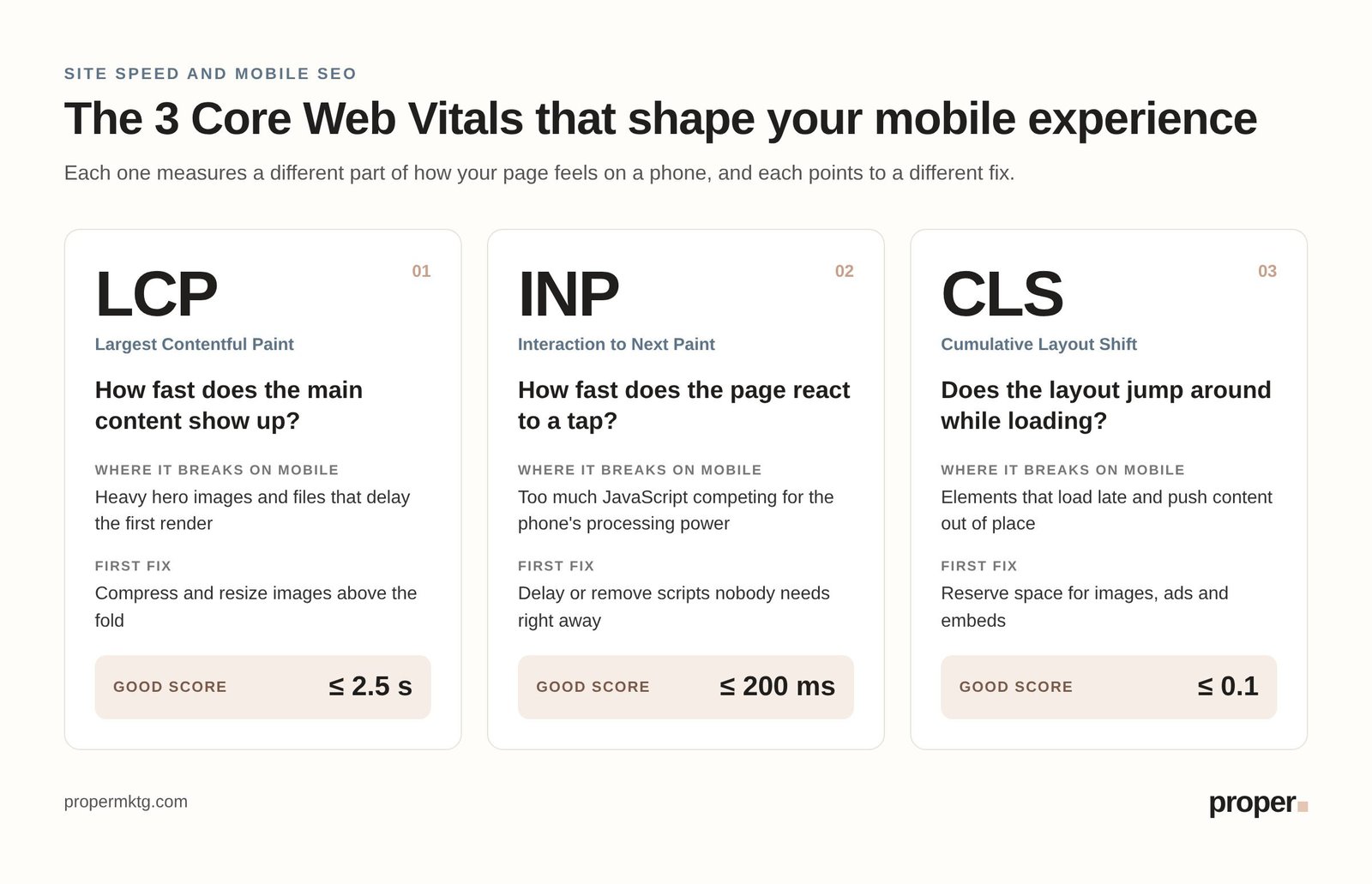
Think of a visitor trying to book an appointment. They need to see the page, tap the right button and complete the form without delays or moving targets. These metrics help identify what gets in their way.
How a slow website costs you business
Speed problems don’t always show up as an obvious error. Your website still opens, the links still work and the contact form is still there. It just takes more effort to use than it should.
That friction can cost you in several ways:
- Visitors leave before seeing your services. A slow page can lose someone before they understand what you offer or why they should choose you.
- Fewer people complete an inquiry. Someone looking for a physio appointment during their lunch break may move on if your booking page stalls or the form doesn’t respond.
- Paid clicks deliver less value. You still pay to bring visitors to your landing page, even when they leave before contacting you.
- Content discovery can take longer. On larger websites, slow server responses may limit how efficiently Google crawls new and updated pages.
- Good content faces another obstacle. Page experience is one part of search performance. When several pages offer useful, relevant information, a smoother experience can help yours compete.
These problems can be easy to miss if you only check whether the website is online. The better question is whether people can use it comfortably and take the next step.
The site speed fixes worth starting with
You may not need a new website to improve mobile performance. Start by identifying what slows down your most important pages, then fix the issues with the clearest impact.
Image optimization
Images are often one of the biggest sources of page weight. A large hero image may look great on a desktop monitor while making mobile visitors wait unnecessarily.
Compress images, use appropriately sized files and serve modern formats such as WebP or AVIF where supported. Responsive images help the browser download a version that suits the visitor’s screen.
Images further down the page can usually load as visitors approach them. Your main hero image needs different treatment: if it’s the largest visible element, delaying it can make loading performance worse.
Code cleanup, caching and render-blocking files
Every plugin, stylesheet and script adds work for the browser. Some of that work is necessary. Some may come from features you no longer use.
Remove unused code and review files that delay the initial display of the page. Browser caching also helps returning visitors by storing files that don’t need to be downloaded again on every visit.
These changes need to be tested carefully. Deferring the wrong script or removing a stylesheet without checking dependencies can break a menu, form or booking tool.
JavaScript that keeps your page responsive
Chat widgets, tracking tools, sliders and embedded content can all compete for a phone’s processing power.
That doesn’t mean you need to remove every useful feature. It means deciding what needs to load immediately, what can wait and what no longer serves a purpose.
Start with a simple question: does this tool help visitors take action, or is it making that action harder?
Keep what earns its place, delay what can wait and remove what you don’t use.
Measure first, then fix
Start with PageSpeed Insights and test your most important pages, including your homepage, main service pages and booking or contact page.
The report provides two types of information:
- Field data, when available, reflects real visitor experiences.
- Lab data tests the page under simulated conditions and helps diagnose performance problems.
For site speed and mobile SEO, start with the mobile report. Use the findings to understand what needs work, rather than treating the performance score as a ranking score.
Save your results before making changes. Record available Core Web Vitals data and the main issues identified for each page, then compare results after each round of fixes.
Lab results can help you assess changes quickly. Field data takes longer to reflect improvements because it covers a rolling period of real visits.
Finally, open the same pages on your own phone using mobile data. Try the menu, tap the booking button and complete the form. This won’t replace measurement, but it can reveal frustrating details that a report alone won’t explain.
A practical order for making improvements
Use your test results to set priorities. For many service websites, this is a useful starting point:
- Test your key pages on mobile and save a baseline.
- Optimize oversized images, especially the main image near the top of each page.
- Address files that delay the initial display of your content.
- Configure caching for files that rarely change.
- Review third-party scripts and remove or delay unnecessary JavaScript.
- Retest performance and check that menus, forms and booking tools still work.
The right order depends on the problem. If server response time is the main bottleneck, image compression alone won’t solve it. If a booking widget makes the page unresponsive, that deserves attention before smaller cosmetic improvements.
Give each task a clear goal so you can tell whether the change helped.
Speed is one part of technical SEO. Our technical SEO checklist for 2026 covers the rest of the foundation, including crawling, indexing and site structure.
How Proper can help
Proper is a boutique digital marketing agency based in British Columbia. We help clinics, professional services and wellness businesses make their websites easier to find and easier to use.
Our work covers technical SEO, site speed and mobile SEO, web design, Google Ads and AI search visibility. We start with the pages that matter most to your business, explain what’s slowing them down and prioritize improvements with a clear purpose.
If you’re considering outside help, our guide to technical SEO services explains what a good engagement should include. You can also explore our medical courier SEO case study to see our approach in practice.
Not sure what to fix first? Book a free consultation with Proper. We’ll review your mobile performance and help you identify where to start.
Frequently Asked Questions
Is page speed still a ranking factor?
Yes. Google’s ranking systems use Core Web Vitals, which measure loading performance, responsiveness and visual stability. But speed is one consideration among many. A fast website still needs useful, relevant content, and a strong performance score doesn’t guarantee higher rankings.
Does mobile speed affect local SEO?
Mobile speed matters for people finding your business through local searches. Someone looking for a nearby clinic or service needs to access your information, call or book without unnecessary delays.
A faster website can help turn that visibility into inquiries. It doesn’t guarantee a higher position in Google Maps.
What are Core Web Vitals and why do they matter?
Core Web Vitals measure loading performance, responsiveness and visual stability. They include Largest Contentful Paint (LCP), Interaction to Next Paint (INP) and Cumulative Layout Shift (CLS).
They help you identify problems that make a page frustrating to use, such as slow-loading images, delayed responses and content that moves unexpectedly.
How do I check my mobile page speed?
Enter your page URL into PageSpeed Insights and review the mobile report. Start with your main service pages and contact or booking page, and save the results before making changes.
Then try those pages on your own phone over mobile data. Check how quickly the content appears and whether buttons, menus and forms work smoothly.
Will fixing speed alone improve my rankings?
It may help, but there’s no guarantee. Improving speed addresses one part of page experience; it doesn’t replace useful content, keyword research or on-page SEO.
The practical benefit is a website that’s easier to use and gives visitors fewer reasons to leave before contacting you.