
A patient wakes up with a sore back and searches for a physiotherapist nearby. Another spends their lunch break comparing two clinics, reading reviews and checking who has an appointment available. Both are ready to take the next step. SEO for clinics helps your practice turn up in those searches and gives patients the information they need to book.
Try searching on your phone for your main service and neighborhood, just as a patient would. Open your clinic’s listing and website. Do the hours, services and booking link match what your front desk would tell someone today? If anything is out of date, start there.
What patients actually do before they book
A patient searching on their phone might scan the map results, check the star ratings and open one or two clinic websites. They want to know whether you treat their issue, whether your hours work for them and how to book.
Some patients ask ChatGPT or use Google’s AI answers for a recommendation before opening a map. Local SEO for doctors and clinics covers many of the same basics across Google Maps, traditional search and AI tools. Keep your clinic details consistent, describe your services clearly and show who provides the care.
Take a physiotherapy clinic with three physiotherapists, one registered massage therapist and a single location. Patients book online through its practice management system. We’ll use that clinic as an example throughout.
Start with accuracy, not keywords
A clinic website can fall out of date quietly. A practitioner leaves, hours change or a treatment gets dropped. Patients may only find out when they call to book.
Say our physiotherapy clinic stopped offering acupuncture last spring. If the service page still shows up in search, a patient could find it, call and learn the service is gone. They might ask about another treatment or simply call the next clinic on the map. Before you write anything new, go through your service pages and practitioner bios with your front desk. Ask whether each service is still available as described and whether every practitioner’s details are current.
Use this healthcare SEO checklist to see what else to review.
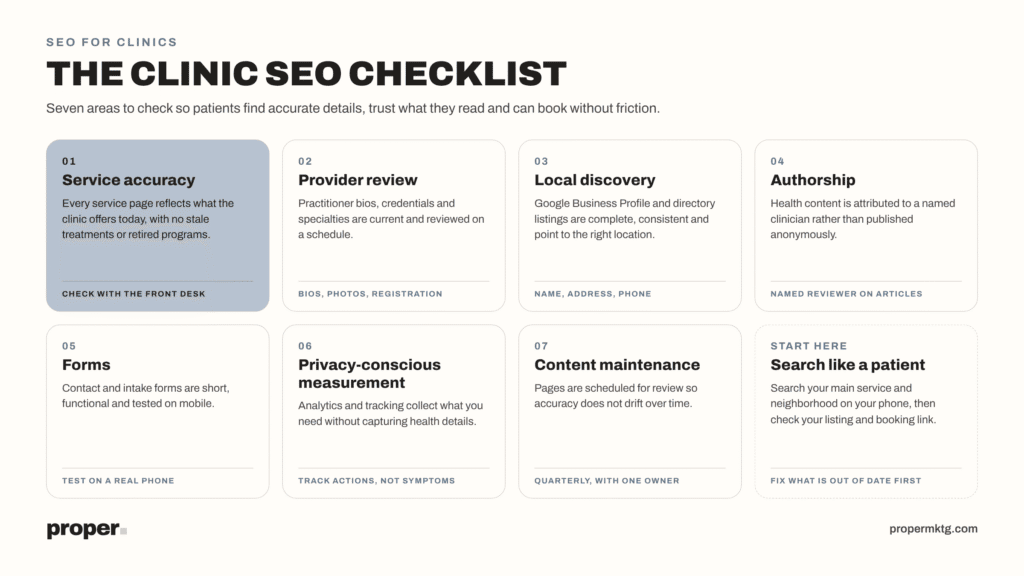
Set a regular date to review practitioner bios, credentials and specialties. For articles that give health information, name the qualified clinician who wrote or reviewed the piece. Our clinic could add “Reviewed by [physiotherapist name], Registered Physiotherapist” at the top of each article and link it to the reviewer’s bio.
The local foundation: Google Business Profile and listings
For many patients, your Google Business Profile is the first thing they see. Fill in the profile so people can check your hours, see what you offer and book directly. Then make sure your clinic name, address and phone number match across local listings.
Here’s what our physio clinic would check.
- A primary category that reflects the clinic’s main service, such as “Physiotherapist,” with secondary categories for other services it offers
- Service names patients recognize, such as “sports injury physiotherapy” or “back pain treatment”
- Regular and holiday hours, including evening or weekend availability
- A link that takes patients straight to the booking page
- Accessibility details, such as a step-free entrance or nearby parking
- Recent photos of the entrance, reception area and treatment rooms
When your hours change, update your website, profile and directories together. To find listings you may have forgotten about, search your clinic’s phone number on Google and open the results. Check Apple Maps, Bing Places, Yelp and healthcare directories for old names, addresses or phone numbers. See our guide to local SEO for service businesses.
Reviews and medical trust signals
Reviews can influence local rankings and help patients decide where to book. If your clinic asks for reviews, choose a point in the patient journey that feels natural, such as the last appointment in a treatment plan. A short text or email with a direct link is easy to act on.
Keep public replies general and leave out details that could identify someone as a patient or reveal anything about their care. A reply to a critical review could say, “Thank you for sharing your feedback. We’d like to hear more. Please contact our clinic manager at [phone or email].” Before settling on a template, check it with your provincial regulatory college and privacy advisor.
Patients also want to know who they’ll see. Give each practitioner a current photo and a bio that explains their credentials, the issues they treat and how to book with them.
Service pages that match what patients search
Good SEO for clinics starts with keyword and search intent research. For each service, look at the words patients use and what they want to know before they book. Build the page around those questions, including who the treatment is for and what happens at the first visit.
Our clinic might call a service “vestibular rehabilitation,” while a patient searches for “physio for dizziness” or “vertigo treatment near me.” Keep the clinical term and use plain language in the title, introduction and headings where it fits. Google’s “People also ask” section can give you ideas. If you use Google Search Console, check the queries report to see how people already find your site.
Give each core service a page of its own and make it easy to use on a phone. Patients should be able to find your number or booking button quickly. Put the time into explaining the service clearly before making near-identical pages for nearby cities.
- Open with two or three sentences that explain what the service is and who it helps.
- Describe what happens at the first visit and how long it takes.
- List the practitioners who offer the service and link to their bios.
- Explain payment options, including whether you bill extended health plans directly.
- Put a booking button near the top and another at the end.
If your current site makes those changes difficult, this is the kind of page structure we build into our web design.
Technical structure, schema and page experience
Give each page a descriptive title and clear headings, keep the XML sitemap current and link related pages. Our clinic’s main “Physiotherapy” page could link to “Sports injury physiotherapy” and “Vestibular rehabilitation,” with a link back from each treatment page.
To check the mobile experience, load your booking page on a phone using cellular data and see how long it takes. Then check the browser tab for each service page. A title like “Vestibular Rehabilitation” tells patients more than “Services.” Find more checks in our guide to site speed and mobile SEO.
Adding schema markup gives search engines a structured way to read details such as your clinic’s name, address, hours and phone number. If your website platform makes it hard to add or update those details, ask your developer to take a look. Google lists the supported fields in its documentation on local business structured data.
Forms, booking and privacy-conscious measurement
Try booking on a phone as if you were a new patient. Open the booking link, send a test inquiry and make sure it reaches an inbox someone checks. Look at what the form asks for, too. Our physio clinic might collect a name, contact details, a preferred time and a short optional note, then handle the medical intake in its practice management system after booking.
Use analytics and conversion tracking to see which pages lead to calls, direction requests and bookings. Keep health information out of those tools. You can record a form submission without capturing what the patient typed. Check whether your form settings or confirmation page URL send a condition name or other health details to analytics. Review the setup with whoever handles privacy for your clinic before adding tracking scripts.
Getting recommended in AI search
If a patient asks an AI assistant where to get physiotherapy for dizziness, clear service descriptions give it something specific to draw on. Current clinic details, named authors with relevant credentials and direct answers to common questions help it describe your practice accurately.
Try asking an AI assistant which clinics offer your main service in your area. If your clinic comes up, check the details. When something is wrong, look for old listings or wording on your site that could be causing confusion. We cover how these searches differ in SEO vs AEO vs GEO.
Keeping clinic content current
A quarterly review helps you catch updates that slipped through. Put one person in charge. At our physio clinic, the manager could set a calendar reminder and check the following each quarter.
- Practitioner bios, photos and credentials
- Service pages, including treatments the clinic has added or stopped offering
- Hours on the website, Google Business Profile and directories
- Insurance, direct billing and payment information
- The booking process on a phone
Update the affected pages as soon as someone joins or leaves, or when a policy such as your cancellation fee changes.
Common SEO for clinics mistakes
Check your site and listings for these common issues.
- City pages that repeat the same text with a different place name
- Health articles with no named author or reviewer
- Booking links that send patients to the homepage
- Public review replies that confirm someone was a patient
- Hours that differ between the website, profile and directories
- Tracking scripts that collect data the clinic hasn’t reviewed
What to measure beyond rankings
Compare calls, direction requests, form submissions and completed bookings month over month. See which service pages generate inquiries and which get visits without much follow-through. That gives you a better idea of where patients might be getting stuck.
Say the vestibular rehabilitation page gets steady traffic but few bookings. The button may be hard to find, the page may leave patients unsure whether the service is right for them, or it may be unclear whether their benefits cover it. Start with the clearest issue, change one thing and watch for a trend over the next few months.
A practical starting order
- Claim and complete your Google Business Profile with current services, hours and a direct booking link.
- Review every service page and retire pages for services you’ve stopped offering.
- Name the clinicians who write or review your health content and include their credentials.
- Test the mobile booking process from the search result to the confirmation.
- Check what your tracking collects before adding anything new.
- Give one person responsibility for reviewing clinic content each quarter.
How Proper approaches SEO for clinics
At Proper, SEO for clinics starts with what patients see before they book. We check your Google Business Profile, listings, service pages and booking process together. You work directly with the founder and know what’s changing, why we’re changing it and how we’ll measure the results.
An audit can uncover things like an incomplete profile, a service page that leaves patients with questions or a booking form that fails on mobile. See how we handled a project in our medical courier SEO case study or learn more about our SEO services.
Request a free SEO audit or book a call to go over your clinic’s results with us.
Frequently asked questions
How long does SEO take for a clinic?
It depends on where you’re starting and how much competition there is for your services. An incomplete Google Business Profile may offer quicker gains in local visibility, while competitive service keywords can take longer. Start with accurate listings and a booking process that works on mobile, then check progress each month.
Do we still need a website if we rank on Google Maps?
Yes. Patients often open your website from the map listing to see whether you treat their issue, who they’ll see and how to book. Try it on your phone and check whether the page answers all three questions.
How is clinic SEO different from regular local SEO?
Clinics use the same local SEO basics, with extra care around health content, reviews and tracking. Have qualified clinicians write or review health information, keep patient details out of public replies and check what your analytics collect. Confirm the privacy details with your regulatory college or privacy advisor.
Should we optimize for AI search tools as well?
Yes. Start with the work that also helps patients searching on Google. Explain your services clearly, keep clinic details consistent across listings, name the clinicians behind your content and answer common questions directly. Check every few months to see how AI assistants describe your clinic.
Can our own staff write the clinic’s content?
Yes. Your team already hears the questions patients ask before an appointment, which makes those questions a good starting point. Have a qualified practitioner review anything that gives health information and include their name on the page. Start with your three most booked services.
What should we ask before hiring someone for SEO for clinics?
Ask how they protect patient privacy in tracking, how they handle review responses and what they report each month. Ask each provider for a written scope so you can compare which work is included at each price.