
Say a physiotherapy clinic has spent months on a new website. The design is cleaner, the booking button is easier to find and the service pages finally make sense. Then the site goes live, and over the next few weeks fewer people find the clinic on Google and fewer booking requests come in. Website launch SEO planning is the work that helps prevent that. It is a set of decisions you make before go-live, plus a short list of checks you run afterward, so the new site keeps the search visibility the old one built up over the years.
In most cases the design is not what causes the drop. What usually happens is that pages moved, disappeared or stopped being crawlable, and nobody mapped the old site to the new one before the switch. The good news is that these problems are predictable, so you can plan for them. This guide walks you through the steps in the order you would actually do them, with examples from clinics, professional services firms and wellness businesses.
What website launch SEO planning actually covers
Website launch SEO planning covers everything that affects how search engines find, read and rank your pages when you replace one site with another. That includes your URLs, redirects, indexing settings, tracking, page speed and the content on your most important pages. It does not replace the design work. It runs alongside it.
Here is the short version of the sequence, from first step to last:
- Baseline: record which pages bring in organic traffic, the searches they show up for and the links pointing to them.
- Planning: decide which page on the new site will own each important topic.
- Comparison: crawl the old site and the staging site, then compare them.
- Redirects: write and test a map from every old URL to its new home.
- Indexing: remove staging blocks, update the sitemap and check canonical tags.
- Measurement: install analytics, form tracking and structured data before launch.
- Performance: compress media, minify files and turn on caching.
- Post-launch: crawl the live site, watch for errors and compare pages against your baseline.
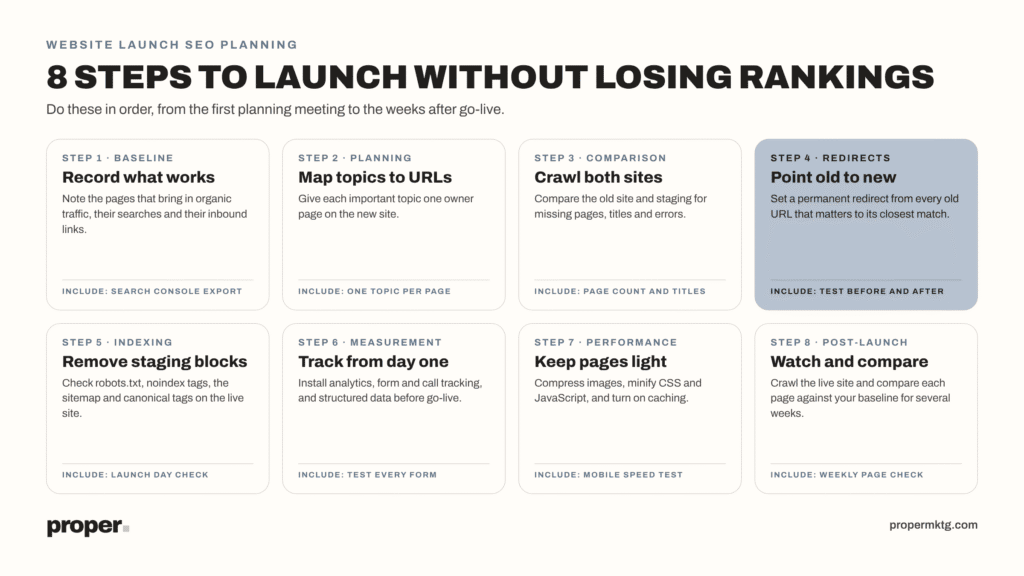
If you only remember one thing, make it this: know what your current site is doing before you change it, and give every page that matters a clear destination on the new one.
Why website launch SEO planning should start before the design is final
Start the SEO side of the launch at the same time as the design, not the week before go-live. When SEO gets left to the end, every decision tends to be made under pressure. Redirects get written in an hour, missing pages get noticed by a patient or client instead of by you, and indexing settings get forgotten.
Planning early also changes the design itself. If you know that your “sports injury physiotherapy” page brings in a steady stream of new patients, you will make sure the new navigation gives it a prominent place instead of tucking it three clicks deep. If you know an accounting firm’s “small business tax filing” page has links from local business directories, you will keep that URL or redirect it carefully.
The goal is to make launch week boring. When the technical work is planned, the switch usually goes smoothly, and you can spend your energy on the parts of the launch your customers will actually notice.
Record a baseline of your current site
Before anything changes, write down what the current site is doing. You want a plain document or spreadsheet that answers three questions:
- Which pages bring in organic traffic, and roughly how much?
- Which searches does each of those pages show up for?
- Which URLs do other websites link to?
Google Search Console is the best free place to start. The Performance report shows which pages and queries get clicks, and the Links report shows which pages other sites link to. Your analytics tool can add detail on which of those visits turn into bookings, calls or form submissions.
This baseline becomes your reference point. Without it, you can’t tell whether a dip after launch is a real problem or normal week-to-week movement, and you can’t confirm that nothing important was left behind. Export the data and save a copy, because the reports will start to mix old and new URLs once the new site is live.
Map keywords to URLs on the new site
Next, decide which single page on the new site will own each important topic. This is usually called a keyword to URL map, and it is one of the most useful documents you can create during a redesign. Do it before the sitemap is locked and before the new copy is written.
A good map follows a few simple rules:
- Give each page one primary topic, so two new pages don’t end up competing for the same search.
- Give every page that currently earns traffic a clear home on the new site, even if its URL changes.
- Write a note for each page you plan to retire, with a decision about where its content and links should go.
Imagine a dental clinic that currently has separate pages for “teeth whitening” and “cosmetic dentistry,” and the new design merges them into one. The map is where you decide which topic the merged page will target, which URL it will use and how the other page will be redirected. Making that call on paper is much easier than untangling it after launch.
The map does two jobs at once. It guides the structure of the new site, and it gives you most of your redirect list later on.
Crawl the old site and the staging site, then compare
Once the new site is built on a staging address, crawl both versions and compare them side by side. A crawler is a tool that visits every page the way a search engine would and records what it finds. Screaming Frog, Sitebulb and the site audit tools inside most SEO platforms can all do this.
Save the results from each crawl, then compare:
- The total number of pages
- Page titles and meta descriptions
- Headings on each page
- Internal links between pages
- Status codes, such as pages that return errors
This comparison tends to surface the problems you would otherwise find weeks after launch. You might spot service pages that exist on the old site but not the new one, or a section where the new menu buries a popular page. It is also common to find templates that replaced every page title with the business name, or URLs that changed without anyone noticing.
Fix what you find on staging, then crawl again. It may take two or three rounds before the two versions line up the way you want.
Build and test your redirect map
Use the comparison to build your redirect map. List every old URL that matters in one column and its closest equivalent on the new site in the next. When a page has moved, set a permanent redirect (a 301) from the old address to the new one.
A permanent redirect tells search engines the page has moved and points them to its new address. It also sends along most of the value from links that point to the old URL. If a page simply disappears and returns a “not found” error, search engines and visitors get nothing useful from it, and any links pointing to it stop helping you.
Be thoughtful about where each redirect goes. Say a law firm is replacing three short pages about wills, estates and powers of attorney with one detailed estate planning page. All three old URLs should redirect to that new page, because it covers the same need. Sending them all to the homepage instead is usually less helpful, because the visitor has to start their search again.
Test the map before launch if your staging setup allows it, and test it again on the live site right after the switch. Check a sample of old URLs in a browser and confirm each one lands on the right page in a single step, without a chain of redirects in between. Google’s guide to moving a site with URL changes is a useful reference if you want more detail on how search engines handle the move.
Get indexing settings right on launch day
Check your indexing settings on the live site on launch day, not just in the plan. Staging sites are usually hidden from search engines on purpose, and that protection has to come off when the new site goes live. A leftover setting is one of the most common and most avoidable launch mistakes.
Robots file and noindex settings
Staging sites are often hidden with a rule in the robots.txt file, a “noindex” tag on every page or a setting like WordPress’s “discourage search engines” checkbox. If any of these carry over to the live site, the pages may look perfect to visitors while search engines are told to stay away.
On launch day, open the live robots.txt file and confirm it allows crawling. View the source of a few key pages and check that there is no noindex tag. If you use WordPress, check the reading settings too. Then make sure the staging copy itself is still blocked, so search engines don’t find two versions of your site.
Sitemap, canonical tags and preferred domain
A few related items belong in the same review:
- Your XML sitemap should list the new URLs and be submitted in Google Search Console.
- Canonical tags should point to the live version of each page, not the staging address.
- Versions of the site with and without “www,” and with “http” and “https,” should all lead to one preferred address.
If your new site runs on WordPress, an SEO plugin like Yoast can handle titles, descriptions and sitemap generation in one place. A plugin won’t plan the launch for you, but it does make it less likely that a template ships without the basics.
Set up tracking and structured data before go-live
Install your analytics, tag manager, form tracking and conversion events before launch, and test them on the live site on day one. If measurement is missing for the first week or two, you lose the comparison that tells you whether the launch worked. It also becomes harder to tell a launch problem apart from an ordinary seasonal dip.
Test each conversion the way a customer would. Submit the contact form, click the phone number on a mobile device and run through the booking flow for a spa or personal training session. Then confirm that each action shows up in your analytics.
Structured data falls into the same category. If the old site used markup that helped pages display well in search results, such as business details, reviews or FAQs, carry it across to the new templates. Then check it with Google’s Rich Results Test before and after launch.
Check speed, images and caching
Test the speed of your key pages before launch, especially on mobile. New sites tend to launch heavier than the old ones, with large hero images, video backgrounds and extra plugins. A slow page is harder for people to use and may be harder for search engines to crawl efficiently, so speed belongs in website launch SEO planning rather than in a separate project.
Start with images and media. Resize images to the size they actually display at, then compress them. Keep video files lean and avoid autoplaying large media that visitors didn’t ask for. Review the media library too, because unused files often get migrated along with everything else.
Then look at the code. Minifying CSS and JavaScript removes characters the browser doesn’t need, and caching helps returning visitors and crawlers load pages faster after the first visit. Both are standard launch tasks and both are easy to forget when everyone is focused on how the homepage looks. If you want to go deeper, our guide to site speed and mobile SEO covers what to check and how to read the results.
Review content and accessibility on your key pages
Read the new versions of your highest-value pages against the originals before launch. Copy often gets rewritten during a redesign, and sometimes the terms a page used to rank for disappear along the way. A wellness studio’s “prenatal yoga classes” page might become “Gentle movement for every stage,” which sounds nice but no longer matches what people type into Google.
You don’t need to keep every sentence. Check that the substance is still there: the service name, the location if you serve a local area, the questions customers usually ask and the details that help them decide.
Accessibility fits naturally into the same review. Ask a few simple questions as you go:
- Can someone use the menu and forms with only a keyboard?
- Do images have useful alt text?
- Are headings in a logical order on each page?
- Do internal links describe where they lead?
These checks help real visitors, and they also make the site easier for search engines to understand. Compliance is a separate track, covering items such as privacy information and cookie notices where they apply. Confirm what your business needs in your province or state with a qualified advisor rather than relying on a checklist.
Common website launch SEO mistakes
Most launch problems come from a handful of repeat issues. Watch for these:
- Leaving a staging block in place. The site looks fine, but search engines are told not to index it.
- Changing URLs without redirects. Old links and bookmarks lead to error pages, and the pages lose the value they built up.
- Redirecting everything to the homepage. It is quick to set up, but visitors and search engines usually lose the context of what they were looking for.
- Rewriting copy without checking keywords. A page may read better but stop matching the searches it used to show up for.
- Launching without tracking. You have no clean way to compare before and after.
- Changing too much at once after launch. If rankings move, you can’t tell which change caused it.
A crawl comparison before launch tends to catch most of these while they are still easy to fix.
What to watch in the weeks after website launch
After launch, your job is mostly to observe and fix. Crawl the live site as soon as it is public and confirm that redirects work, the sitemap loads and no important page returns an error. In Google Search Console, check the Pages report for new errors and the Performance report for changes in clicks.
Then compare organic traffic page by page against your baseline. If one page drops close to zero, it usually has a redirect or indexing problem, and that is much easier to fix in week one than in month three. Some movement across the site is normal while search engines process the change, so look at trends over several weeks rather than single days.
Try not to make big changes during this period. Keep the redirect map in place for as long as the old URLs might still be linked or bookmarked, which usually means years rather than months. Update your internal links so they point directly to the new addresses, so the redirects act as a backup rather than the main path.
How Proper approaches website launch SEO planning
At Proper, we treat website launch SEO planning as part of the build from the first meeting. Before any design work starts, we look at your current pages, your Search Console data and the links pointing to your site. That way we know what needs protecting before anything moves.
From there, we build the keyword to URL map, crawl the old and staging versions, write and test the redirects, and check indexing and tracking on launch day. After launch, we compare results against the baseline and fix issues as they come up. We explain what we’re changing, why it matters and how we’ll measure it, in plain language, and you work directly with the founder throughout.
If you’re planning a new site, our web design services include this launch planning as standard, and our SEO services cover the ongoing work after go-live. You can see how this looks in practice in our medical courier SEO case study. Not sure where your current site stands? Take the free SEO audit to get a starting point, or book a call to talk through your launch.
Frequently asked questions
Will a new website always hurt my rankings?
No. Rankings often dip after a launch because pages moved without redirects, content changed or indexing settings were left on. When the URL map, redirects and crawl checks are handled before go-live, many sites hold their positions, though a short period of movement is normal while search engines process the change. Record a baseline before launch so you can tell normal movement from a real problem.
Should I keep my existing URLs where possible?
Keeping URLs the same removes a whole category of risk, so it is worth doing when the current structure still makes sense. If a URL has to change, map it to its closest equivalent and set a permanent redirect. Update your internal links to point to the new address, so the redirect is a backup rather than the main path.
How long before I know whether the launch went well?
Watch closely for the first few weeks, then keep an eye on trends for a few months. Crawl the live site on launch day and compare organic traffic per page against your baseline each week. Look at the trend over several weeks rather than reacting to a single day.
What is the most common website launch SEO mistake?
Leaving a staging block in place and changing URLs without a redirect map are two of the most common. Both can be easy to miss, because the site looks fine and the problem only shows up in traffic data later. Run a crawl comparison before launch and check the live robots.txt file on launch day.
Do I need to redirect every single page?
Every page that earns traffic, receives links or serves a clear purpose should have a destination on the new site. Minor pages with no traffic and no links can often be retired, as long as you decide that deliberately. Write the decision down in your redirect map so nobody has to work it out again later.
Who should handle SEO planning for a website launch?
It depends on your team. If you have someone comfortable with Search Console, crawling tools and redirects, you can handle it in-house using the steps above. If not, bring in help before the build starts rather than after launch. Ask any provider to show you their redirect plan and how they will measure results before you agree to anything.