
Your website looks good. Your services are clearly explained. But your pages still aren’t showing up where potential clients can find them. Before rewriting everything, it’s worth checking whether a technical issue is getting in the way.
Technical SEO helps search engines access your site, understand its pages and decide what to index. It covers things like site structure, loading speed and the settings that can accidentally keep useful content out of search.
You don’t need to tackle everything at once. This technical SEO checklist explains what to check, why it matters and which issues to address first, so you can spend your time on the fixes that matter to your site.
The 2026 technical SEO checklist at a glance
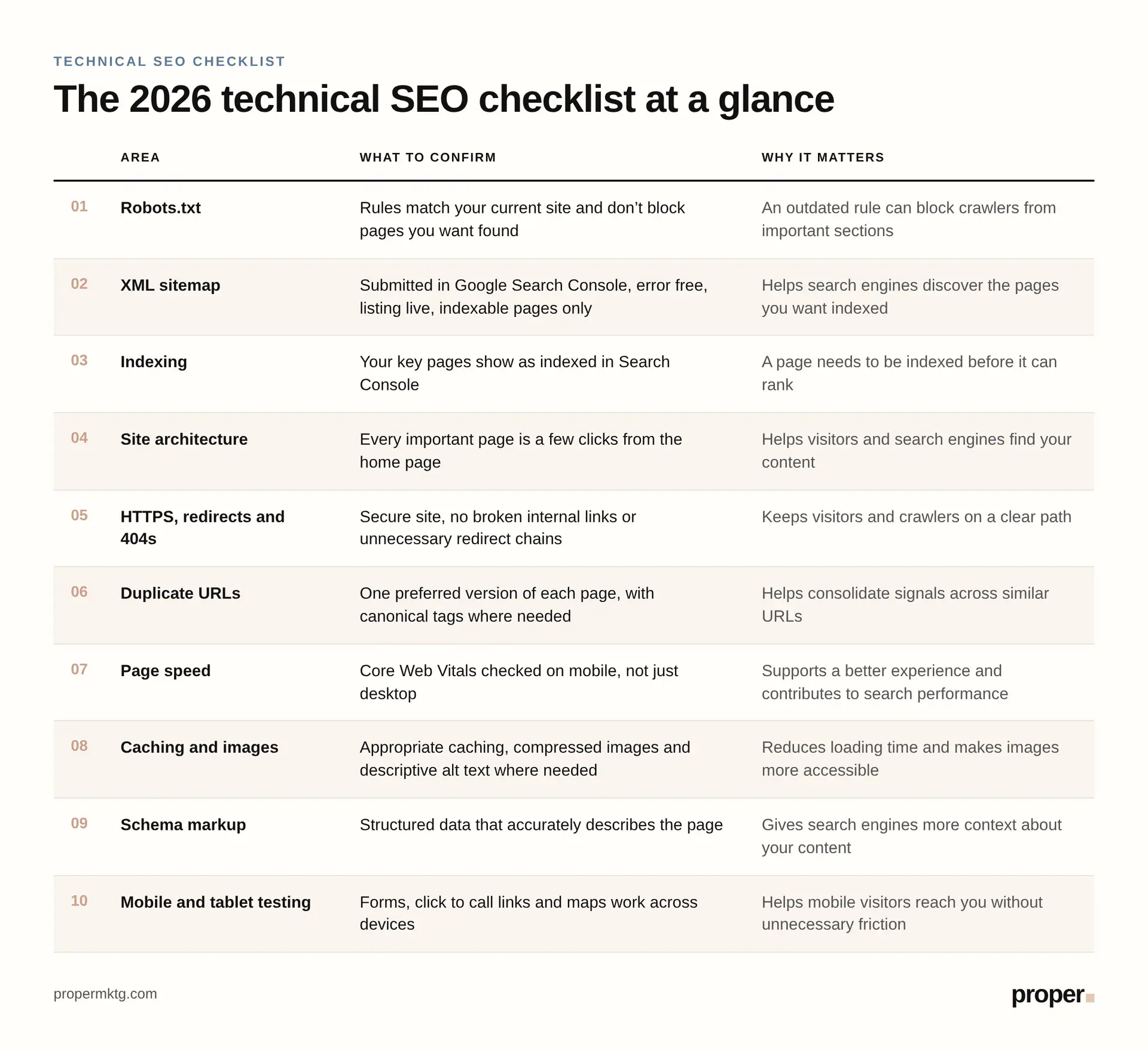
Start with crawlability and robots.txt
Robots.txt tells search engine crawlers which parts of your site they can access. An old rule from a redesign or a setting carried over from staging can block pages you intended to make public.
Open the file at yourdomain.com/robots.txt and review each rule. Does it still make sense for your current site? Check that important pages aren’t blocked and that the file includes your sitemap location.
There’s an important distinction here: robots.txt controls crawling, not indexing. A blocked URL can still appear in search results if Google discovers it through other links. If a public page shouldn’t appear in search, use a noindex directive and allow Google to crawl the page so it can see that instruction.
Confirm indexing before you go any further
Before spending time improving a page’s keywords or copy, confirm that Google has indexed it.
Open Google Search Console, review the Pages report and check your most important URLs with the URL Inspection tool. This shows whether each page is indexed and can help you investigate why a page is missing. While you’re there, check that your XML sitemap has been submitted and can be read without errors.
Start with the pages that bring in business: your main services, location pages and other key landing pages. If one is missing, check whether it has internal links, is blocked from crawling, returns an error or contains an unintended noindex directive.
Give the site a structure people can follow
Site architecture is how your pages connect. Visitors should be able to move from your home page to the service they need without having to search for it.
Important pages need relevant internal links and a clear place within the site. For a clinic, that might mean linking each treatment page from the main services page and connecting related treatments where it helps the reader.
Sketch out your main pages and the links between them. If a page is difficult to reach, add a logical route to it. A useful page shouldn’t depend on someone finding an old blog link or knowing its exact URL.
Clean up broken pages, redirects and duplicates
As your business changes, your website collects old URLs. Services get renamed, pages move and links that once worked start leading nowhere.
Focus on three areas:
- HTTPS: make sure your pages load securely and that alternate HTTP versions redirect to HTTPS.
- 404s and redirect chains: update broken internal links. When a page moves, redirect its old URL directly to the most relevant replacement, without unnecessary stops along the way.
- Duplicates: keep one preferred version of each page. Use redirects or canonical tags where appropriate to clarify how alternate URLs should be handled.
If a page has been removed and there’s no relevant replacement, a proper 404 response can be appropriate. Sending every old URL to the home page usually creates a confusing experience.
Treat speed, caching and images as one job
A slow website makes it harder for people to read about your services, complete a form or book an appointment. Page speed also contributes to Google’s assessment of page experience.
Core Web Vitals measure three parts of that experience: how quickly the main content loads (LCP), how responsively the page reacts to interactions (INP), and how much the layout shifts while loading (CLS). PageSpeed Insights helps you investigate these issues, with real visitor data where enough is available.
Start with these practical checks:
- Compress and resize images before uploading. Use dimensions that suit where the image will appear. Add descriptive file names and appropriate alt text.
- Check your caching setup. Caching can reduce repeated work for your server and help pages load faster.
- Test on a phone over regular mobile data. Try opening a service page, using the menu and submitting a form. Notice what feels slow or gets in the way.
These are useful starting points. If the site still loads poorly, scripts, plugins, hosting or the theme may need a closer look.
Add schema markup where it adds clarity
Schema markup is structured data that gives search engines more context about your pages. For a small business, LocalBusiness or Organization schema can describe the business, while Service schema can describe what a service page offers.
If you use Yoast, some structured data may already be in place. Check what your site generates before adding more, especially if several plugins handle SEO settings.
FAQ schema also needs realistic expectations. Most business websites shouldn’t expect it to produce expandable FAQ results in Google. Include FAQs because they answer useful questions, rather than because you expect extra space in search results.
Keep schema accurate and consistent with the visible page. It can support clear content, but it won’t fix missing information or a page that search engines can’t access.
Test every device, not just your own
Google primarily uses the mobile version of your content for indexing, so your mobile site needs the same care as your desktop version.
Check your most important pages on a phone and a tablet. Test forms, booking flows, click to call links and maps. Make sure the text is readable, buttons are easy to tap and nothing important disappears on a smaller screen.
If you run a physio clinic, go through the appointment process as a new patient would. Can you find the right treatment, understand the next step and complete the booking easily? That exercise often reveals problems you won’t notice while reviewing the page on a laptop.
How to work through the checklist in order
Start with issues that prevent access and discovery, then work through performance and usability.
- Read robots.txt and fix anything blocking pages you want found.
- Confirm in Search Console which pages are indexed and investigate those that are missing.
- Improve the architecture so every important page has a clear path to it.
- Clean up HTTPS issues, broken internal links, redirect chains and duplicates.
- Compress images, review caching and retest Core Web Vitals on mobile.
- Add or correct schema markup where it accurately describes the page.
- Test forms and key journeys on a phone and a tablet.
- Record your changes and recheck after a redesign or platform switch.
If something is actively preventing inquiries, such as a broken booking form, fix it immediately. The checklist gives you a practical order, but your business priorities still matter.
Mistakes that quietly undo good work
- Chasing speed scores before checking whether key pages are indexed.
- Using robots.txt when the goal is to keep a public page out of search.
- Making several unrelated changes without recording them.
- Testing only on desktop.
- Uploading full resolution photos without checking their size.
- Leaving a staging site accessible to search engines.
- Finishing an audit without checking whether the fixes worked.
- Treating technical SEO as something you never need to revisit.
When to bring in help
You can handle many of these checks yourself. The harder part is figuring out why something is wrong and which fix will actually address it.
A service page that stays out of the index, recurring sitemap errors or persistent speed issues may need a closer investigation. An audit is useful when it gives you clear priorities, explains the cause and shows what needs to happen next.
For an example of our work with a local courier company, explore our medical courier SEO case study, or browse more of our work.
Proper is a boutique digital marketing agency based in British Columbia. We help clinics, professional services and wellness businesses with technical SEO, keyword research, on-page optimization, content strategy and AI search visibility.
We explain what we find in plain language and build the work around your business goals. If you’re unsure what’s holding your website back, book a free consultation to talk through what you’re seeing and where to start.
Frequently Asked Questions
How long does technical SEO take?
It depends on the size of your site and the issues involved. Correcting an unintended robots.txt rule may be straightforward. Reviewing a larger site with years of redirects, duplicate pages and platform changes takes more time.
There’s also a difference between completing a fix and seeing its effect in search. Google may need to crawl and process the updated pages before changes appear.
Do I need technical SEO if my site only has a few pages?
Yes. A small website can still have indexing problems, broken links or slow pages. If you rely on a handful of service pages to bring in inquiries, a problem with just one can affect a meaningful part of your search visibility.
The checks may be simpler on a small site, but they still matter.
Can I do technical SEO myself?
You can handle many of the basics yourself, including checking indexing in Search Console, reviewing robots.txt, compressing images and testing your site on a phone.
More complex issues may need help from an SEO specialist or developer. If you’re unsure what a setting does, understand its effect before changing it, especially when it controls crawling, indexing or redirects.
Does technical SEO still matter with AI search tools?
Yes. Search and AI discovery tools need access to useful, readable information about your business. Crawlability, clear site structure and accessible content support that discovery, although different tools use different sources and systems.
Technical SEO doesn’t guarantee a mention in ChatGPT, Perplexity or Google’s AI Overviews. It helps remove obstacles that can make your content harder to discover and understand.
How often should I recheck the checklist?
Recheck after a redesign, platform migration or major theme change. These updates can affect URLs, internal links, indexing settings and page performance.
Between major changes, monitor Search Console and investigate unexpected drops in organic traffic or missing pages. Regular checks help you catch problems before they build up.