Someone nearby searches for “physiotherapist near me.” Someone else hears about your clinic and looks up its name. Before either of them reaches your website, Google shows them your address, hours, photos and reviews.
Think of that panel as your storefront window on Google. People decide whether to walk in based on what they see there, usually in a few seconds. Can they tell what you offer? Are your hours right? Is there an easy way to book?
That panel is your Google Business Profile. When the details are missing or outdated, you’re giving potential clients a reason to keep scrolling.
Google Business Profile setup is free, and the basics are quick. The part that takes a little more thought is choosing the right categories, getting verified and making the profile genuinely useful. Here’s how to get it right.
What Is a Google Business Profile?
Google Business Profile, previously called Google My Business, is a free tool for managing your business information on Google Search and Maps.
It’s where you keep your contact details, list your services, share photos and respond to Google reviews. For local businesses, it’s the quickest way for potential clients to understand what you do and decide whether to contact you.
Your profile and website work as a team. The profile gives people the essentials. Your website gives them the detail they need to feel confident booking.
If you run a clinic, wellness practice or professional service business that meets clients in person, treat your profile like your front desk. It’s often the first part of your business people deal with.
Before You Start: Check Eligibility and Existing Listings
Before you create anything, check Google’s eligibility guidelines. This matters most if you work from home, travel to clients or work out of someone else’s space. Then search your business name and city on Google Maps.
If a listing already exists, claim it. Don’t create a new one. If someone else manages it, request ownership through Google. Duplicate profiles split your reviews and leave clients unsure which address or phone number to trust. Make sure you’re working with the right listing before you touch anything else.
Google Business Profile Setup, Step by Step
The exact prompts vary a little by business, but the main steps are:
- Sign in to your Google Account. Use an account your business controls, so you never lose access when someone leaves.
- Visit business.google.com/add. Find your existing business or follow the prompts to add it.
- Enter your real business name. Use exactly the name on your signage, website and invoices. No extra keywords and no city names unless they’re genuinely part of the name. Stuffing the name is one of the fastest ways to get a profile suspended.
- Choose your primary category. Pick the one that best describes your main business activity.
- Add your location or service area. Follow the prompts based on whether clients visit you, you travel to them or both.
- Add your phone number and website. Test both and make sure they take people to the right place.
- Complete verification. Google decides which methods are available for your business. Follow the instructions shown in your profile.
- Finish the remaining details. Add your hours, services, description, photos and any booking links or attributes that apply.
Entering your details takes minutes. Verification can take longer, so don’t leave it to the week you need the profile live.
The Details Worth Getting Right
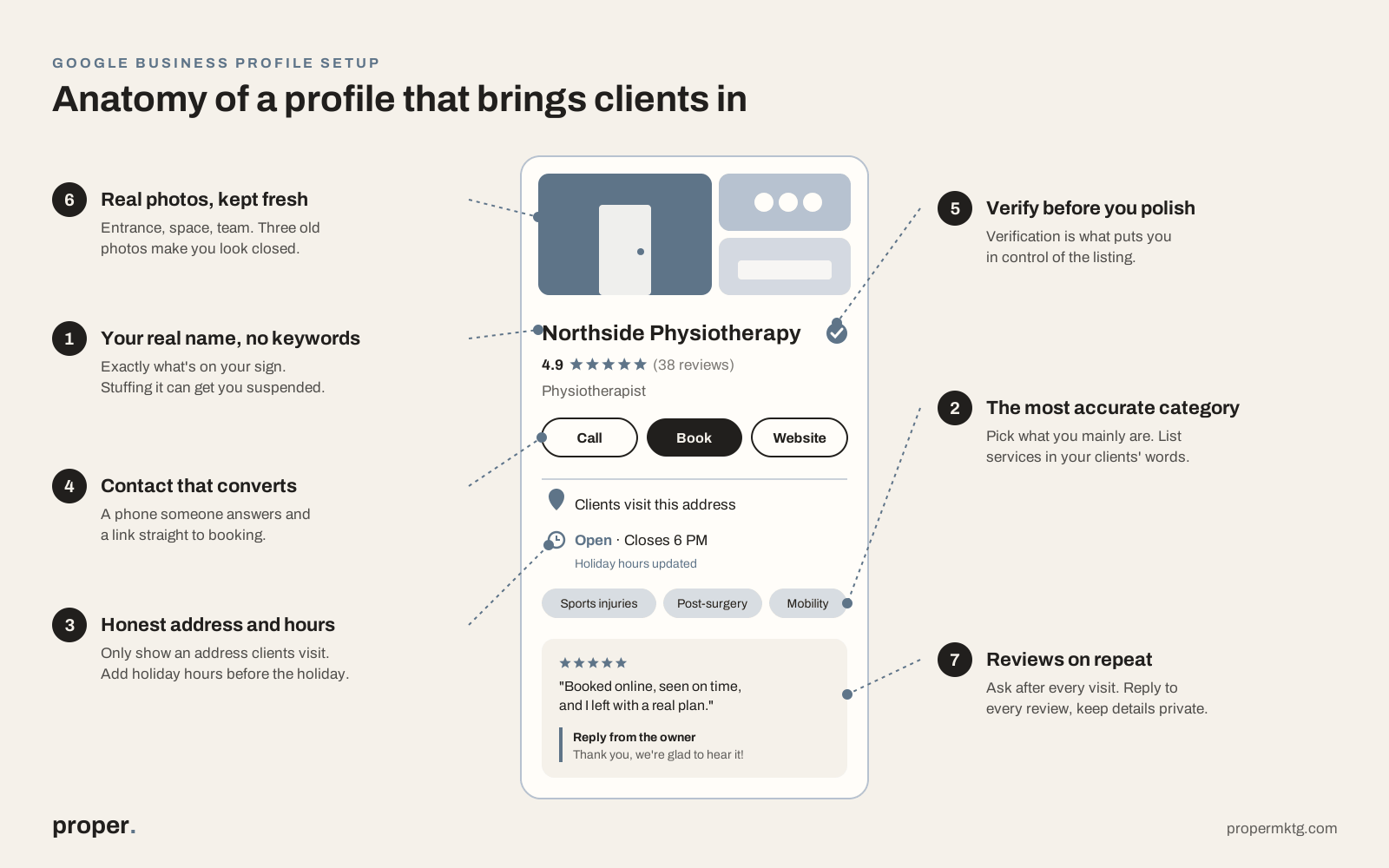
Filling in the boxes is the easy part. These are the details that decide whether your profile actually brings people in.
Choose an Accurate Primary Category
Your primary category should describe what your business is, not every service it offers. A practice focused on physiotherapy should pick the most accurate physiotherapy category available, not a broader label just because it sounds bigger.
Use additional categories for other core parts of the business. You don’t need one for every treatment, product or service.
Set Your Address, Service Area and Hours
Only show your address if clients can actually visit you there during the hours you list.
If you travel to clients and don’t see them at your address, hide it and list the areas you serve. If you do both, follow Google’s guidance for businesses with a location and a service area. Pick areas you can realistically cover. Claiming half the province only brings in inquiries you can’t serve well.
Then double-check your hours and add special hours for holidays. Nothing earns a one-star review faster than a client standing in front of a locked door.
Describe Your Business and Services Clearly
Your description should say what you do, who you help and why clients choose you. Be specific. “Physiotherapy for sports injuries, post-surgical recovery and everyday mobility” tells people far more than “quality care with a difference.”
Do the same with your services. Use the names your clients would search, like “deep tissue massage,” “corporate tax returns” or “Invisalign consultations,” and add a short description where you can. Keep the list current as your services change. Skip the keyword repetition. It makes the profile harder to read and doesn’t help anyone choose you.
Add Photos That Help People Know What to Expect
Show your entrance, your space, your team and your work, with permission whenever people are in the shot. An exterior photo helps first-time visitors find you. Interior and team photos make you feel familiar before they even arrive.
Start with a solid set and keep adding. A profile with three photos from two years ago looks closed, even when you’re fully booked.
Make Contacting You Easy
Use a phone number someone actually answers, and test your website link. Point people to the page that represents your business best. If you have an appointment link, use it to send them straight to booking.
Every extra step between “this looks good” and booking is a chance to lose someone. The fewer steps it takes to call, inquire or book, the better.
Share Updates When You Have Something Useful to Say
Updates are a good place to highlight a new service, an upcoming event or a seasonal reminder. You don’t need to post every day. Post when it helps clients, not to fill space.
Make Reviews Part of Your Routine
Reviews are word of mouth that lives on Google, right next to your name. Make asking for them a normal part of your follow-up, not something you remember twice a year.
- Ask right after a completed service or project. The experience is still fresh, so the feedback is more useful.
- Share a direct review link. Put it in your follow-up email or print a QR code for the front desk.
- Keep requests neutral. Ask everyone for honest feedback. Don’t offer rewards, and don’t only ask the clients you expect to be happy.
- Reply to every review. Thank people for their feedback and handle concerns calmly, without sharing private information. A calm reply to a critical review often does more for you than the review does against you.
For clinics and health practices, keep replies general. Never confirm someone is a patient or discuss their treatment, even if they brought it up first.
What to Do After Verification
Once you’re verified, look at your profile the way a client would, on both Search and Maps. Check your business name, map pin, phone number, website, hours and booking links. Click every link yourself. Don’t assume it works.
After that, update the profile any time your details change, and review it a few times a year to catch outdated photos, missing services or changes Google suggests. Some edits go through review or need another verification step, so give big changes some time. Outdated info is worse than a thin profile as it sends away people who were ready to book.
Common Google Business Profile Setup Mistakes
These are easy to miss, and every one of them costs you clients:
- Adding keywords to the business name instead of using the real name.
- Choosing a category that only loosely describes the business.
- Creating a duplicate profile without checking for an existing listing.
- Showing an address where clients can’t visit.
- Leaving verification unfinished.
- Publishing incorrect hours or broken links.
- Using only a logo and giving visitors no sense of the business.
- Leaving reviews unanswered and information out of date.
Fix these before you spend time on anything fancier.
How Your Profile Fits Into Your Local Marketing
Your profile should tell the same story as your website and every other listing. Keep your core details identical everywhere, and make sure your site clearly explains your services, location and how to book. Someone clicking from your profile to your site should know instantly they’re in the right place.
A strong profile is a big piece of local visibility, but it’s one piece. Your website, reputation and wider online presence matter too. For the bigger picture, read our guides to local SEO for service businesses and what small business SEO services should include.
Need Help Setting Up Your Google Business Profile?
Setting up a profile is easy. Setting it up so it brings in clients, and keeping it that way while you run your business, is the part most owners never get to.
At Proper, we set up, optimize and manage Google Business Profiles as part of our SEO services for clinics, professional services and wellness businesses. Book a call and let’s look at your profile together.
Frequently Asked Questions
Is Google Business Profile free?
Yes. Adding, claiming and managing an eligible profile costs nothing. Google Ads is a separate, optional service.
Do I need a Google Business Profile if I already have a website?
Yes, if you serve clients locally. Your profile gives people quick access to your location, hours, reviews and contact details. Your website tells them more about your services and how you work.
How do I verify my Google Business Profile?
Follow the verification prompts in your profile. Google decides which methods are available, which may include video, phone, text, email or mail. The options depend on your business, and you may be asked to complete more than one.
What happens if I do not verify my profile?
An existing listing may still show up on Google, but you won’t control it. Verification is what lets you claim and manage it, so finish it as part of your setup.
Can I have more than one profile?
One per eligible location. Separate rules apply to individual practitioners, departments and service-area businesses, so check Google’s guidelines before adding another. Offering several services doesn’t make you eligible for several listings.
Does a Google Business Profile help with AI search?
Accurate business information helps wherever people discover you, but a complete profile doesn’t guarantee a mention in AI-generated results. Treat it as one part of a wider search strategy. Our guide to SEO vs AEO vs GEO explains how these approaches fit together.
How often should I update my profile?
Any time your hours, services, location or contact details change, and a few times a year otherwise. Fresh photos and updates when you have something worth sharing keep it from looking abandoned.